![Icon for Courses-1.png]](https://help.oneclickcontractor.com/hs-fs/hubfs/Icon%20for%20Courses-1.png?width=36&height=36&name=Icon%20for%20Courses-1.png)
Requirements
-
Permission to edit the applicable product price list.
-
An image file ready to upload. If the file does not upload, use a supported image format and try again.
Add a product image
Open the product or create a new product. To update an existing product, hover over it in Products > Price List Editor and select the pen icon. You can also add the image the first time you create a product.
Select Photos, select Upload, and choose the image file. In the product Photos tab, select Upload. Choose the image file you want to attach to this product and select Open.
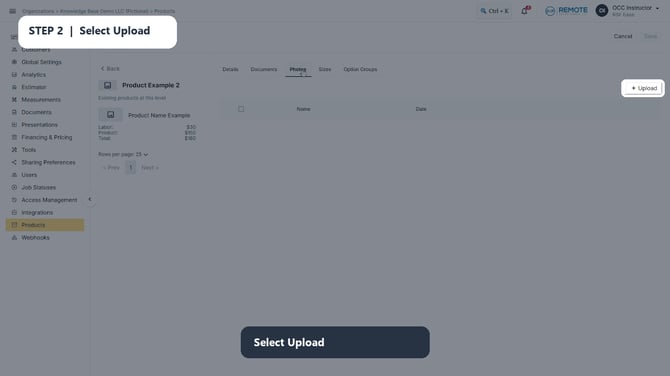
Image description: The product Photos tab before an image is added, with the Upload button available.
Confirm the image in Photos and select Save. Wait for the image file to appear in the product Photos list, then select Save. The file is associated only with the product you are editing.
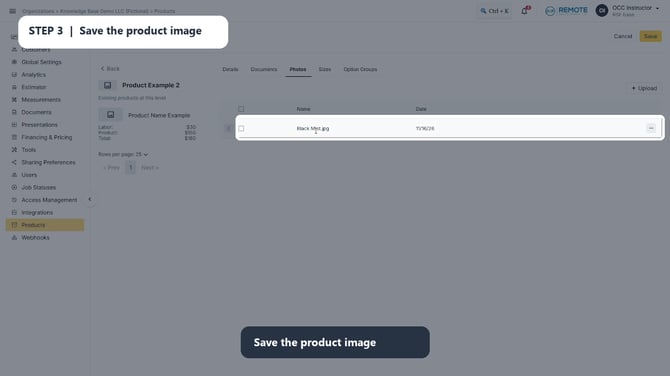
Image description: The uploaded image file listed in the product Photos tab, with Save available.
Activate the price list and verify the product image. Return to the Price List Editor, select Activate, and verify that the product now shows its image thumbnail in the product list.
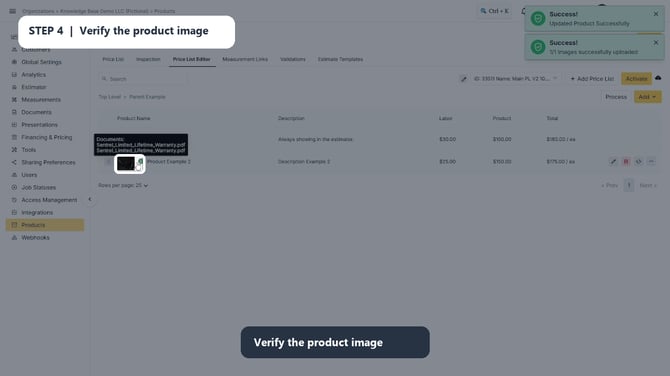
Image description: The product list after activation, showing the image thumbnail for the updated product and the Activate control.
💡 Best practice
Before uploading a replacement, delete any previous image from the product. Then upload the new image, select Save, and activate the price list. This prevents an older image from remaining associated with the product.
Remember
What you see can differ depending on your organization's settings and your permission level. Tab names, headers, and available options are configurable. If you cannot see or do something described here, ask your manager first. They can contact support.