![Icon for Courses-1.png]](https://help.oneclickcontractor.com/hs-fs/hubfs/Icon%20for%20Courses-1.png?height=40&name=Icon%20for%20Courses-1.png)
Article Introduction
The Notes tab allows you to enter and save notes within the Estimator.
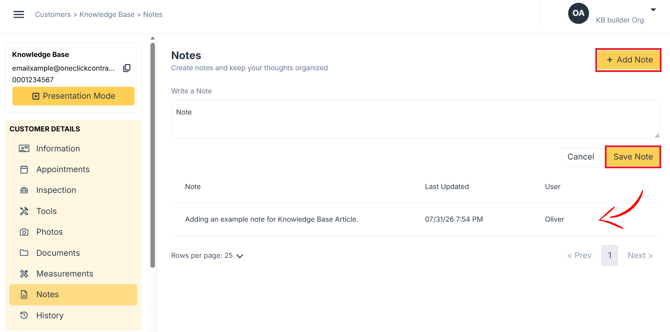
Saved notes appear below the note entry area and include the note text, the date it was last updated, and the user who saved it.
Add a Note
- Open the Notes tab.
- Click Add Note.
- Enter your note in the Write a Note field.
- Click Save Note.
The saved note will appear in the notes list below.
View Saved Notes
Saved notes are displayed beneath the note entry area.
Each entry shows:
- Note
- Last Updated
- User
Newer notes appear first, while older notes continue below them in the list.
How It Looks in the Estimator