![Icon for Courses-1.png]](https://help.oneclickcontractor.com/hs-fs/hubfs/Icon%20for%20Courses-1.png?height=40&name=Icon%20for%20Courses-1.png)
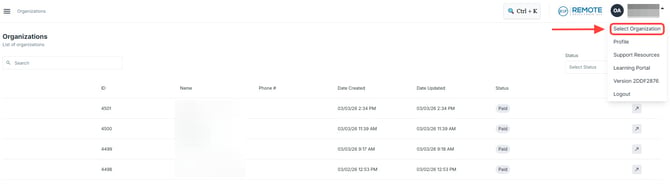
Users with access to multiple organizations must choose the active account before working in the system. The organization selection is available from the user menu in the upper-right corner of the screen.
Step 1: Select an Organization
-
Click your Name.
-
Select Organization.
-
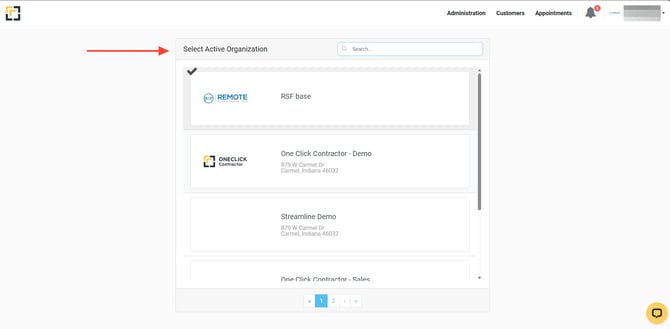
Select the Organization you want to use.
Step 2: Confirm the Active Organization
-
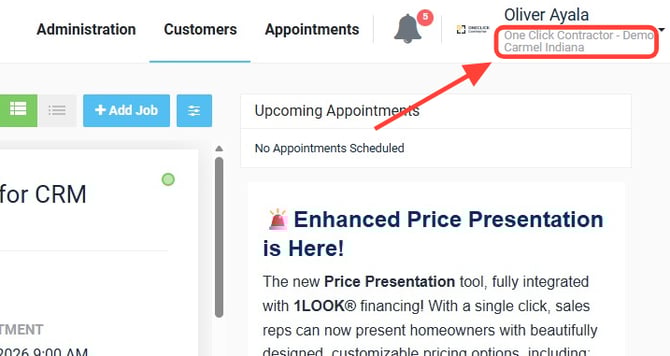
Verify the Organization Name displayed in the upper-right corner.
💡 Notes:
-
Users only see organizations they have permission to access.
-
Switching organizations does not change user permissions.
-
Always confirm the active organization before creating estimates, managing pricing, or updating records.