![Icon for Courses-1.png]](https://help.oneclickcontractor.com/hs-fs/hubfs/Icon%20for%20Courses-1.png?width=36&height=36&name=Icon%20for%20Courses-1.png)
Before you begin
-
The document must already have been sent for signature and must still be incomplete.
-
The sales rep must already be listed as a signing recipient. This process does not add a new recipient.
Steps
Open the customer record, select Signatures, and then select Signable Documents.
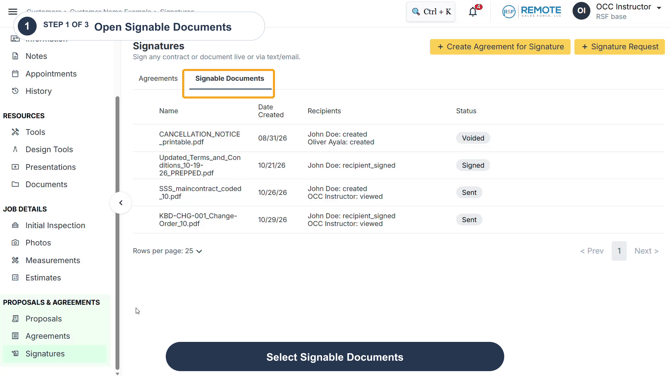
Step 1
Locate the sent document that needs review. Hover over the document row and select Email/Sign.
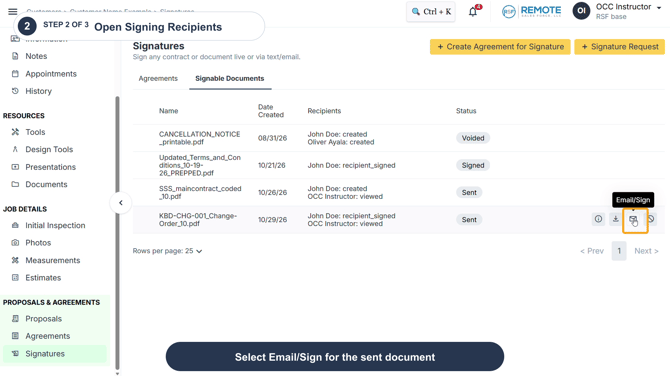
Step 2
In Signing Recipients, locate the sales rep and select the Email icon next to their name.
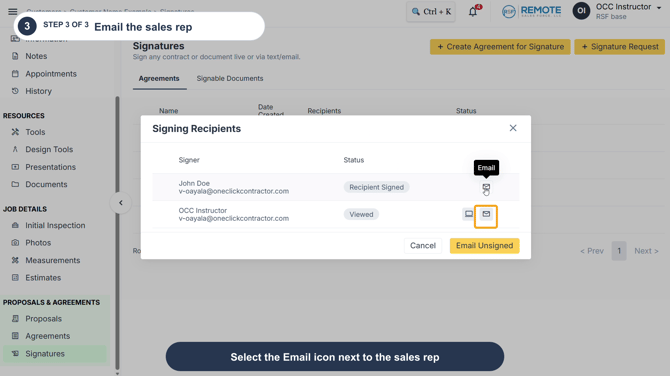
Step 3
Confirm that the signature document was successfully sent.
-
The sales rep opens the new Your document is ready for signature email and selects the signing link. No email screenshot is needed for this step.
-
The sales rep reviews the document content and exits without completing fields or signing, unless they are the intended signer.
Remember
This is a workaround for reviewing a pending document. It resends the sales rep's existing signature email and does not create a new recipient or change the document. Use it only when the rep is already a signer, and do not complete or sign on behalf of another recipient.