![Icon for Courses-1.png]](https://help.oneclickcontractor.com/hs-fs/hubfs/Icon%20for%20Courses-1.png?width=36&height=36&name=Icon%20for%20Courses-1.png)
Article Introduction
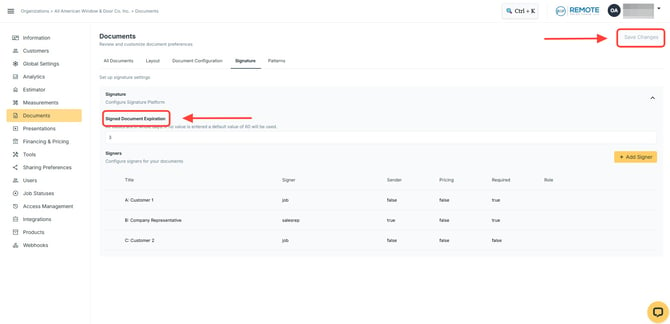
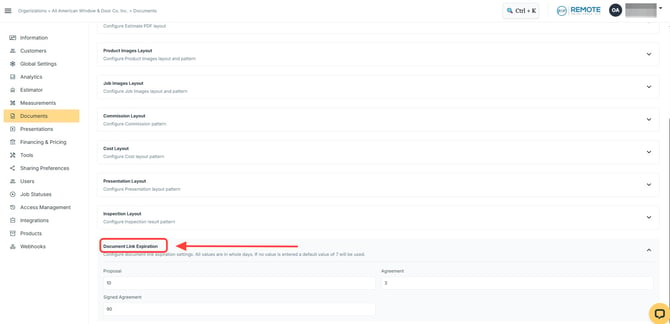
Document expiration settings are managed in the Admin Dashboard. Proposal, Agreement, and Signed Agreement expiration settings are managed from Documents > Document Link Expiration. Job Resources are managed in the Signature settings.
Document Expiration Settings
Document expiration settings control how long document links remain available.
These settings may apply to:
- Proposal
- Agreement
- Signed Agreement
- Job Resources
All expiration values are entered in whole days.
If no value is entered for Document Link Expiration, the default is 7 days.
Proposal Expiration
Proposal controls how many days the proposal link remains available.
For example, if Proposal is set to 10, the proposal link will remain available for 10 days.
Agreement Expiration
Agreement controls how many days the client has access to the link used to sign the agreement.
For example, if Agreement is set to 3, the client has 3 days to open the agreement link and complete the signing process.
Signed Agreement Expiration
Signed Agreement controls how long the client-facing signed agreement download link remains available after signing.
After the agreement is signed, the client receives an email notification where they can download the signed agreement.
The signed agreement can also be downloaded from the Estimator as a PDF at any point. This PDF download is not the same as the expiring client-facing link.
Job Resources
Job Resources are part of document expiration setup, but they are configured in the Signature settings rather than Documents > Document Link Expiration.
Use the Signature settings when configuring or updating expiration behavior for job resource documents.
Updating Document Expiration Settings
To update expiration settings for Proposal, Agreement, or Signed Agreement:
- Go to Admin Dashboard > Documents.
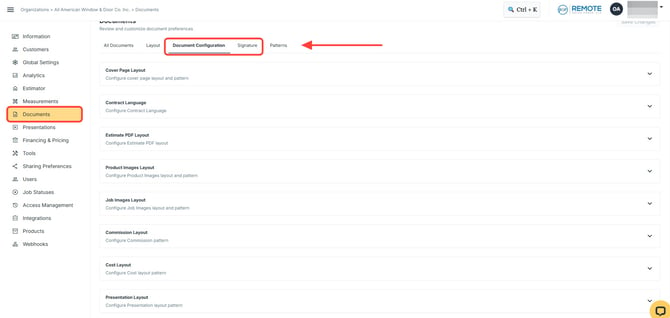
- Locate Document Link Expiration.
- Update the needed value for Proposal, Agreement, or Signed Agreement.
- Save changes.
To update expiration settings for Job Resources:
- Go to the Signature settings.
- Update the needed job resource document settings.
- Save changes.