![Icon for Courses-1.png]](https://help.oneclickcontractor.com/hs-fs/hubfs/Icon%20for%20Courses-1.png?width=36&height=36&name=Icon%20for%20Courses-1.png)
Requirements
-
An application displaying the Frozen Credit alert in 1LOOK.
-
The applicant must be available to contact the listed credit bureau.
Resolve a Credit Freeze
Step 1: Review the Frozen Credit alert. Identify the listed credit bureau and select its name for removal directions.
👉 This alert appears before the application is sent to lenders only when the applicant has an active credit freeze.
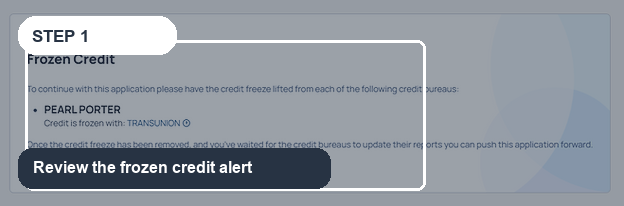
Image description: The Frozen Credit alert identifies the affected bureau and displays the submission button after the freeze is removed.
Step 2: Review the credit bureau directions. Confirm the bureau contact information and the instructions for temporarily lifting the freeze.
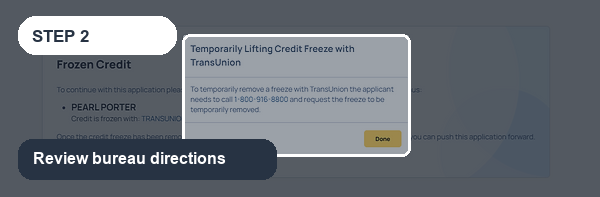
Image description: The bureau directions explain how the applicant can temporarily lift the reported credit freeze.
Step 3: Have the applicant contact the listed credit bureau. The applicant must follow the bureau instructions to temporarily lift the freeze.
Step 4: Select Credit Freeze Removed, Submit Application. Select this after the applicant confirms the freeze has been lifted.
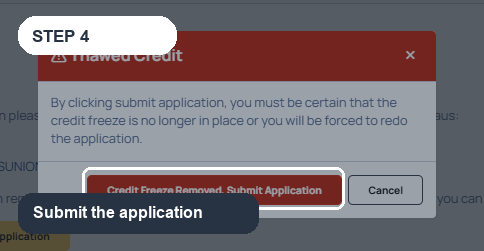
Image description: The Thawed Credit confirmation asks the sales rep to submit the application after the credit freeze is removed.
Remember
What you see can differ depending on your organization's settings and your permission level. Tab names, headers, and available options are configurable. If you cannot see or do something described here, ask your manager first. They can contact support.