![Icon for Courses-1.png]](https://help.oneclickcontractor.com/hs-fs/hubfs/Icon%20for%20Courses-1.png?width=36&height=36&name=Icon%20for%20Courses-1.png)
Requirements
-
Access to the customer's Estimates page.
-
Permission to use Download Cost Sheet.
Download the Cost Sheet
Open the three-dot menu for the estimate. From the customer's Estimates page, locate the estimate and select the three-dot menu at the end of its row.
Select Download Cost Sheet. OCC downloads the Cost Sheet as a PDF that you can open in a PDF viewer.
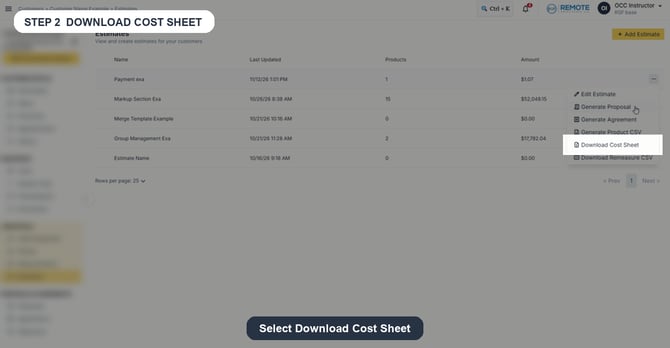
Image description: The supplied recording shows the Download Cost Sheet action in the estimate menu.
What the Cost Sheet includes
The supplied Cost Sheet PDF shows estimate context, product groups, itemized cost columns, and totals.
|
Area |
Included in the supplied PDF |
|
Product groups |
Sections such as Shower & Bath, Fixtures, and Accessories. |
|
Line columns |
Product, SKU, Description, Qty, Labor Cost, Labor Ext, Material Price, Material Ext, and Ext Cost. |
|
Totals |
Total Labor, Total Materials, and Combined Cost. |
Remember
What you see can differ depending on your organization's settings and your permission level. Tab names, headers, and available options are configurable. If you cannot see or do something described here, ask your manager first. They can contact support.