![Icon for Courses-1.png]](https://help.oneclickcontractor.com/hs-fs/hubfs/Icon%20for%20Courses-1.png?width=36&height=36&name=Icon%20for%20Courses-1.png)
Estimates are built using the active price list at the time the estimate is created. If the price list is later updated, older estimates may display a warning indicating they are using outdated pricing.
Why This Happens
When a price list is updated, existing estimates do not automatically refresh pricing. Estimates created before the update remain tied to the price list that was active when they were originally built.
As a result, the estimate may display a message such as:
Price List for this Estimate is not the current one for your org.
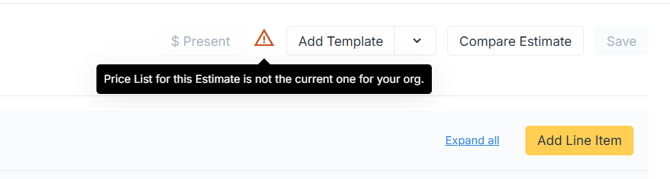
This warning indicates that the estimate is still using outdated pricing data.
How to Resolve the Issue
Step 1: Create a New Estimate
The most reliable solution is to create a new estimate using the updated price list.
-
Click Create Estimate.
-
Build the Estimate using the current price list.
-
Reuse the necessary line items or structure from the previous estimate if needed.
A new estimate will automatically pull pricing from the current active price list.
💡 Notes:
-
Estimates do not automatically update pricing after a price list change.
-
Older estimates remain tied to the price list used when they were created.
-
Creating a new estimate ensures pricing reflects the latest price list.
-
If you cannot create or manage estimates, contact your administrator for assistance.