![Icon for Courses-1.png]](https://help.oneclickcontractor.com/hs-fs/hubfs/Icon%20for%20Courses-1.png?height=40&name=Icon%20for%20Courses-1.png)
Article Introduction
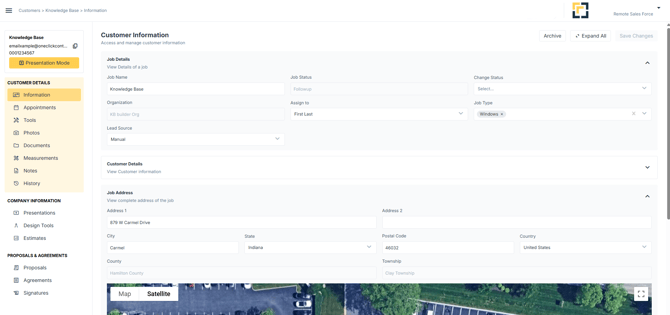
The Customer Overview Navigation Menu is the primary way users move through a customer job in One Click Contractor. Each section serves a specific purpose in managing the customer, building estimates, presenting information, and closing the sale.
Tool Menu High Sight
-
Information: Contains the customer’s core details, including contact information and job-related data, address, etc.
-
Appointments: Used to schedule, view, and track meetings related to the customer, with all appointments retained for historical reference.
-
Tools: Provides quick access to internal and third-party resources used during sales, inspections, and presentations; tools are configured during onboarding or added later on.
-
Photos: Stores images related to the job, which can be used internally or included in proposals and agreements when needed.
-
Documents: Acts as a centralized storage area for customer files, allowing documents to be organized, referenced, and optionally included in proposals or agreements.
-
Inspection: Used to document property conditions through structured inspection items, with results that can be reused in presentations, proposals, and agreements.
-
Measurements: Stores all property measurements used for estimating, which feed directly into estimates to support accurate pricing.
-
Notes: Functions as a running internal journal for comments, observations, and important details about the customer or job.
-
History: Provides a chronological log of activity within the customer file, showing what actions occurred, when they happened, and who performed them.
-
Presentations: Stores sales and educational materials used during customer conversations, such as brochures and company presentations.
-
Design Tools: Provides access to visualization tools that help illustrate product and design options for the customer.
-
Estimate: Contains the customer’s estimates, where pricing scenarios are created, reviewed, and managed.
-
Proposal: The Proposal section is used to generate and share a customer-facing proposal based on the selected estimate. Proposals present pricing, options, visuals, and financing details in a format designed for customer review.
-
Agreement: The Agreement section is used to generate the contract or agreement document once the customer is ready to move forward. Agreements pull approved pricing and terms and are used for signature and execution.
-
Signatures: The Signatures section tracks the signing status of proposals and agreements. It shows when documents are sent, viewed, and signed, providing visibility into the completion of the approval process.