![Icon for Courses-1.png]](https://help.oneclickcontractor.com/hs-fs/hubfs/Icon%20for%20Courses-1.png?height=40&name=Icon%20for%20Courses-1.png)
Estimate Groups:
Groups are the structural containers within an estimate that organize line items by scope of work, such as roofing, siding, windows, or doors. Each group represents a logical section of the estimate and helps control how pricing and information are presented to the customer.
Group Tabs:
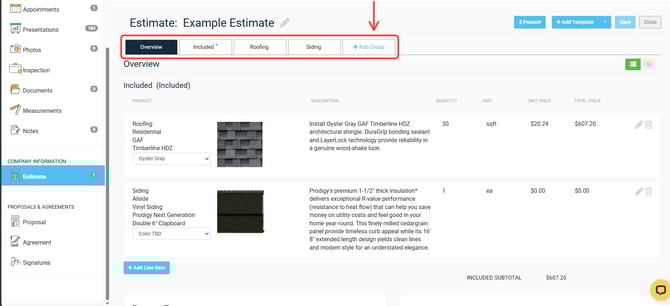
Each estimate includes multiple tabs, with group tabs representing individual scopes. Group tabs appear alongside the Overview and Options tabs and are labeled based on how the group is named.
Included vs. Not Included Groups:
Groups can be marked as either included or not included in pricing. Included groups display a blue star on the tab and contribute to the total estimate price. Not included groups remain visible for discussion purposes but do not affect pricing totals.
Pricing Visibility (Blue Star):
The blue star icon indicates that a group is included in the estimate total. Groups without the blue star are excluded from pricing but can still contain line items and be reviewed with the customer.
Group Naming:
Groups can be renamed to reflect the specific scope of work being discussed. Clear group names improve internal clarity and customer understanding when reviewing the estimate.
-1.webp?width=670&height=300&name=user_cropped_screenshot%20(1)-1.webp)
Group Sequencing:
Groups included in pricing must appear before non-included groups in the Overview tab. The system enforces this order to maintain pricing logic and presentation consistency.
Overview Tab Behavior:
The Overview tab displays all groups together, showing which are included in pricing and which are informational. This provides a high-level summary of the estimate structure and pricing layout.