![Icon for Courses-1.png]](https://help.oneclickcontractor.com/hs-fs/hubfs/Icon%20for%20Courses-1.png?width=36&height=36&name=Icon%20for%20Courses-1.png)
Scope and requirements
-
The integration imports manufacturer quote details into an OCC estimate after the FeneVision WEB integration and manufacturer have been configured for the organization.
-
Use an approved manufacturer endpoint and a DNS-based HTTPS certificate. SSL configured only for an IP address is not supported.
-
The manufacturer must run FeneVision WEB version 17.1 or later and enable WEB Connect for the applicable customer or company and site.
-
Keep manufacturer credentials out of tickets, screenshots, and knowledge-base content.
Frequently asked questions
What does FeneVision WEB import?
It imports the selected manufacturer quote into the current OCC estimate as line items. The sales-rep import article covers the user workflow; this article covers the conditions that must be true for that workflow to work.
Why is the manufacturer missing from the estimate product selector?
Confirm that FeneVision WEB is authorized and shows Connected. Then open the integration Settings, verify the manufacturer record exists, and verify that its toggle is on under Active Manufacturers. A saved manufacturer that remains under Available Manufacturers will not be selectable in an estimate.
Which endpoint should be used?
Use the endpoint approved for the manufacturer. Do not substitute a guessed URL or a customer-specific URL. If a new manufacturer is not already onboarded, stop and route the onboarding request through the internal process before adding it to an organization.
|
Manufacturer |
Approved FeneVision WEB endpoint |
|
HomeGuard |
https://hgiwebcenter.com/WEB |
|
Vytex |
https://orders.vytexwindows.com/WEB |
|
NT Window |
https://myntlink.com/WEB |
Does this article cover iPad configuration?
No. Keep iPad browser tracking settings in the separate iPad-only article. Do not combine that customer-facing guidance with technical integration configuration.
Troubleshooting
Invalid credentials or Sign in failed
Verify the manufacturer username and password, including case sensitivity. Confirm that the same credentials work directly with the manufacturer or in the approved design tool. If they work outside OCC but fail in OCC, verify WEB Connect for the correct FeneVision WEB customer or company and site. The manufacturer owns credential access and WEB Connect access.
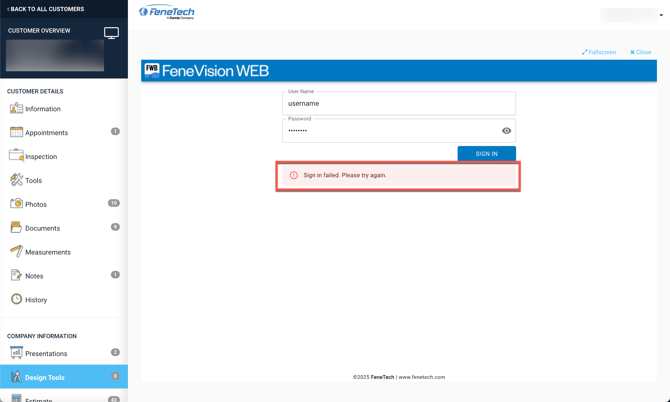
An example of the manufacturer sign-in failure message. Validate credentials and WEB Connect access before escalating.
Failed to Fetch or website refused to connect
Validate the configured endpoint exactly, including HTTPS where supplied. Confirm that the manufacturer site uses a DNS-based SSL certificate, not an IP-address-only certificate. If the endpoint is correct and the manufacturer is onboarded, route CORS, JWT, content-security-policy, or manufacturer website configuration issues through the internal onboarding process.
The sign-in succeeds but no quote is available to import
Confirm with the manufacturer that the signed-in user can access the intended quote. OCC can display the quotes available to that manufacturer user; it does not create or grant access to manufacturer quotes.
The import does not produce the expected estimate lines
Confirm that the user selected the intended quote and wait for the import to complete. Compare the imported lines and totals with the selected manufacturer quote. If the quote is correct but OCC lines are missing or unexpected, capture the quote number, manufacturer, endpoint, time of attempt, and a redacted screenshot before escalating.
When should the integration be reauthorized?
Reauthorize when FeneVision WEB does not show Connected or after an authorization-related change. Do not use reauthorization to resolve invalid manufacturer credentials; those credentials are separate from the OCC integration authorization.
Escalation information to collect
-
Organization and manufacturer name.
-
Configured endpoint, with no credentials included.
-
Whether FeneVision WEB shows Connected and the manufacturer is active.
-
Exact error message, quote number if applicable, and time of the attempt.
-
A redacted screenshot showing the error or unexpected result.
-
Confirmation from the manufacturer that WEB Connect is enabled for the required customer or company and site.
Remember
What you see can differ depending on your organization's settings and your permission level. Tab names, headers, and available options are configurable. If you cannot see or do something described here, ask your manager first. They can contact support.