![Icon for Courses-1.png]](https://help.oneclickcontractor.com/hs-fs/hubfs/Icon%20for%20Courses-1.png?width=36&height=36&name=Icon%20for%20Courses-1.png)
Add a note to a job and review notes saved earlier.
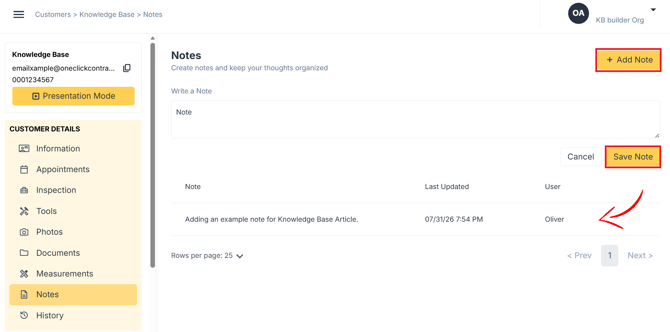
Step 1: Add a note
- Open the Notes tab.
- Click Add Note.
- Enter your note in the Write a Note field.
- Click Save Note.
Step 2: Review saved notes
- Saved notes show below the note entry area, newest first.
- Each note shows the Note, Last Updated date and User who saved it.
For the full guide, see Adding Notes in the Estimator.