![Icon for Courses-1.png]](https://help.oneclickcontractor.com/hs-fs/hubfs/Icon%20for%20Courses-1.png?width=36&height=36&name=Icon%20for%20Courses-1.png)
Before you begin
Open the customer record that contains the signature request you want to review.
Steps
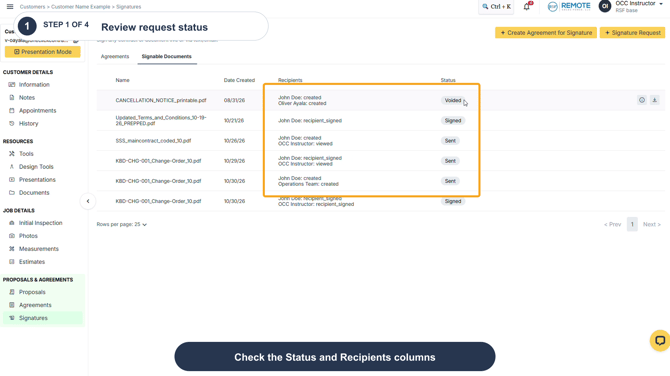
Step 1: Select Signatures. On the Signable Documents tab, locate the request and review the Status and Recipients columns. These show the current request and recipient activity at a glance.
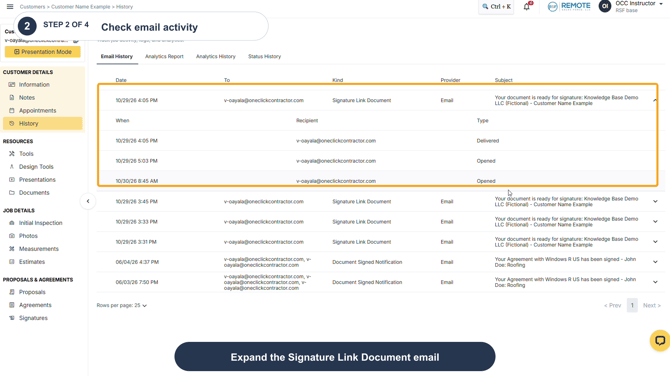
Step 2: To check email delivery activity, select History, open the Email History tab, and expand the Signature Link Document email. The expanded entry shows activity such as Delivered and Opened for the recipient.
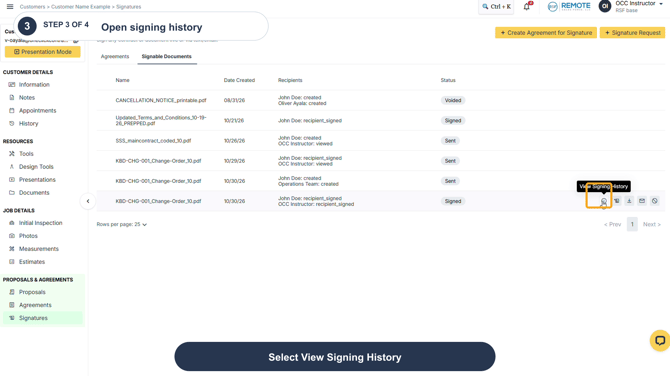
Step 3: To download a signing history report for a completed document, return to Signatures, hover over the document row, and select View Signing History.
Step 4: Choose Standard or Detailed. The selected report downloads as a PDF.
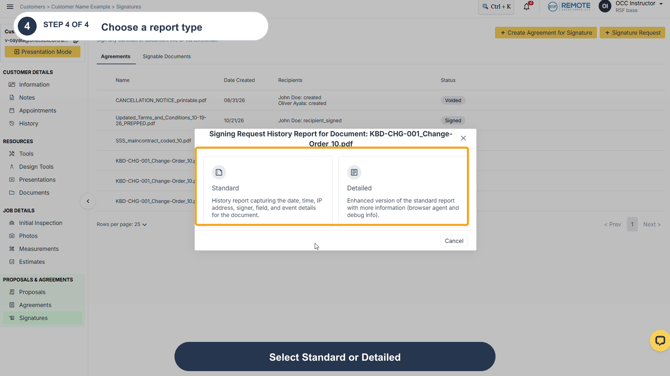
Standard vs. Detailed signing history reports
Both reports show the same signing history for the document. The Detailed report does not add a separate set of events; it expands the same events with more technical context.
|
Included information |
Standard |
Detailed |
|
Document summary, parties, and completion status |
Yes |
Yes |
|
Event timestamp, signer name, IP address, field, and event description |
Yes |
Yes |
|
Client and server timestamps |
|
Yes |
|
Timing difference between client and server |
|
Yes |
|
Browser/system agent |
|
Yes |
|
Signer ID and field ID |
|
Yes |
Use Standard for the normal record of signing activity. Use Detailed when you need the same history with additional technical details, such as browser/system agent or timing information.
Remember
-
Email History shows delivery and open activity for the signature email. It does not confirm that a recipient has signed.
-
Use the document's Status and Recipients columns to review signing progress, and use the signing history report when you need a downloadable record of the signing events.