![Icon for Courses-1.png]](https://help.oneclickcontractor.com/hs-fs/hubfs/Icon%20for%20Courses-1.png?width=36&height=36&name=Icon%20for%20Courses-1.png)
Sales tax settings are preconfigured on the back end for your organization.
These settings determine the default percentage rate and whether sales tax applies to products, labor, or both. The configured information automatically carries over to new estimates.
How Sales Tax Is Applied
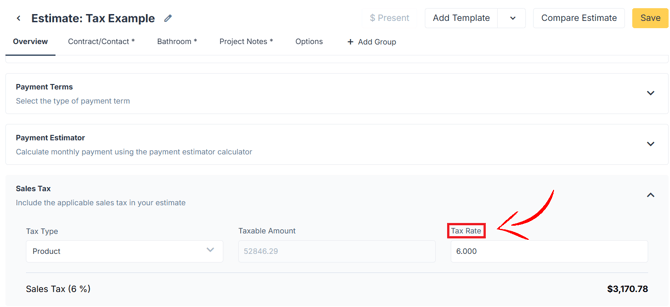
When an estimate is created, the organization’s configured sales tax settings automatically populate in the estimate.
Depending on the configuration, sales tax may apply to:
- Products only
- Labor only
- Both products and labor
Representatives do not choose whether to apply sales tax when it has already been configured for the estimate. Instead, they should review the sales tax section and confirm that the tax has populated correctly.
Changing the Sales Tax Rate
Depending on your organization’s configuration and your permissions, you may be able to change the percentage rate for an individual estimate.
After changing the rate, review the estimate total to confirm that the updated percentage was applied.
💡 Notes:
- Sales tax settings are preconfigured on the back end for your organization.
- Representatives cannot choose whether to apply sales tax when it has already been configured for the estimate.
- Always confirm that the configured sales tax has populated.
- Depending on configuration and permissions, representatives may be able to change the tax percentage for different location requirements.
- Changes made to one estimate do not change the organization’s default settings.