![Icon for Courses-1.png]](https://help.oneclickcontractor.com/hs-fs/hubfs/Icon%20for%20Courses-1.png?width=36&height=36&name=Icon%20for%20Courses-1.png)
If one person has already signed an agreement but another signature is still missing,
Before we get into the process, consider:
Do not create a new agreement. Creating a new agreement starts a separate signature process. This can result in one person signing one agreement while another person signs a different agreement, leaving neither agreement fully completed.
Only one person can sign at a time. Every signer needs to complete the agreement for it to become available.
Step 1: Find the Existing Agreement
- Open the job or estimate.
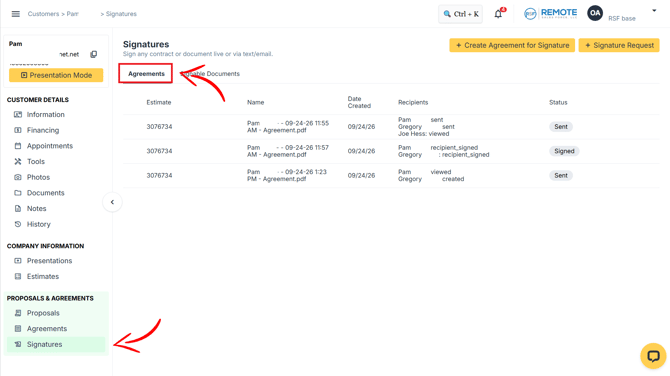
- Go to the Signatures tab.
- Make sure you are viewing the Agreements section.
 He
Each agreement displays its estimate number, name, creation date, recipients, and current status.
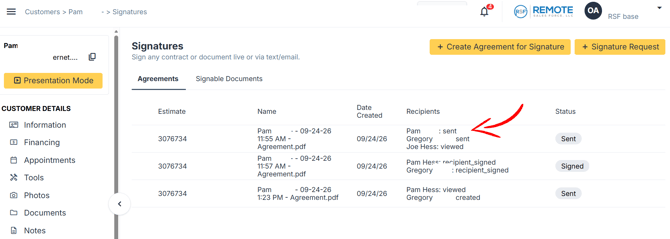
Under Recipients, OCC displays the current status for each person associated with the agreement.
- created: The recipient is part of the signature request but has not completed the signature.
- sent: The signature email has been sent.
- viewed: The recipient has opened or viewed the signature request.
- recipient_signed: The recipient has completed their signature.
To determine whether an agreement is fully completed, check the status beside each required signer.
An agreement is complete when all required recipients show recipient_signed.
Example
If you see:
Customer: recipient_signed Sales Rep: viewed
The customer has already completed their part, but the sales rep still needs to sign.
Note: You should complete the same agreement instead of creating another one.
Step 2: Complete the Missing Signature
Find the agreement that already contains the completed signature you want to keep.
Then:
- Hover over the agreement row.
- Locate the signature/email action that appears.
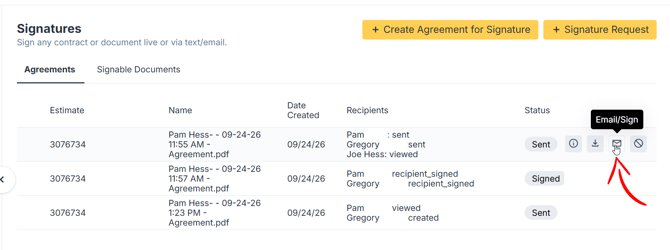
- Choose how the remaining signer should complete the agreement:
- Select the computer/monitor icon to complete the signature on screen.
- Select the email icon to send the signature request by email.
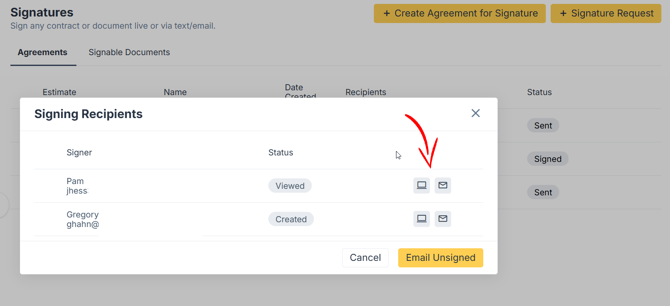
- Have the remaining recipient complete their signature.
- Return to the agreement and confirm that all required recipients now show recipient_signed.
Note: The on-screen signature option is only available for a recipient who still needs to complete their signature.