![Icon for Courses-1.png]](https://help.oneclickcontractor.com/hs-fs/hubfs/Icon%20for%20Courses-1.png?height=40&name=Icon%20for%20Courses-1.png)
Markup Pricing lets organizations calculate estimate pricing from a cost (or baseline) value, then apply a controlled markup or markdown using default percentages and min/max guardrails. This article explains how to turn Markup Pricing on and configure product and labor markup settings in One Click Contractor.
-
Navigate to the Estimator
-
Go to Markup Pricing
-
Click the checkbox to enable markup pricing
-
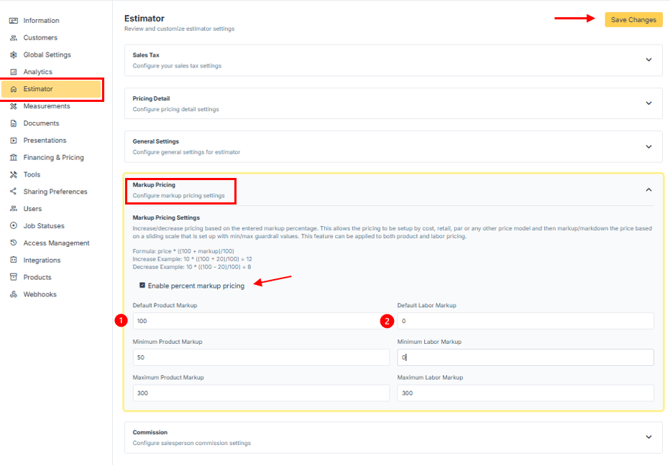
Increase/decrease pricing based on the entered markup percentage. This allows the pricing to be setup by cost, retail, par or any other price model and then markup/markdown the price based on a sliding scale that is set up with min/max guardrail values. This feature can be applied to both product and labor pricing. Make sure to save your changes after making edits.
1. Set your Product Markup
-
Default Product Markup*
-
Minimum Product Markup
-
Maximum Product Markup
2. Set your Labor Markup
-
Default Labor Markup*
-
Minimum Labor Markup
-
Maximum Labor Markup
* Percentage markup comes in by default whenever an estimate gets created and saved.
A couple of Frequently Asked Questions
How does this work for estimates created before this preference was added?
Estimates created prior to enabling this setting will default to a 0% product or labor markup, meaning no price adjustment will occur. After enabling markup, all adjustments must fall within the configured minimum and maximum thresholds for each price type.
What happens if I need to change my min/max values?
Simply edit the preference at the organization (there is no requirement to activate the price list). Now the rep will be able to adjust the markup and pricing based on the newly provided min/max values.
How does this work with discounts?
This feature was developed to work alongside discounts. Discounts will be applied AFTER the markup has been calculated.