![Icon for Courses-1.png]](https://help.oneclickcontractor.com/hs-fs/hubfs/Icon%20for%20Courses-1.png?height=40&name=Icon%20for%20Courses-1.png)
If Job Resulting is not visible for a user, it is usually due to missing permissions. This can be resolved by updating the user’s access settings in the admin dashboard.
Why This Happens
Job Resulting will not appear unless the user has the correct permissions enabled.
Step 1: Fix It
- Go to User Administration
- Select the User
- Open Permissions
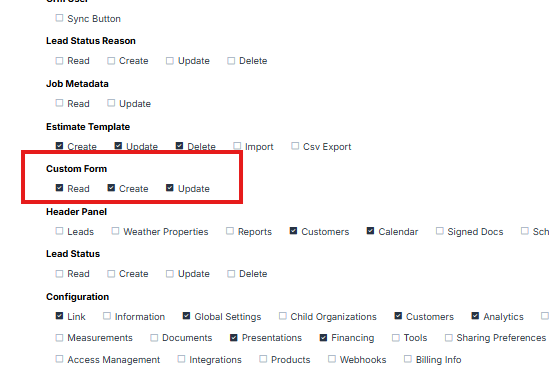
Locate the following section:
- Custom Form
Make sure the following are enabled:
- Read
- Create
- Update