![Icon for Courses-1.png]](https://help.oneclickcontractor.com/hs-fs/hubfs/Icon%20for%20Courses-1.png?height=40&name=Icon%20for%20Courses-1.png)
Here’s how to set it up:
-
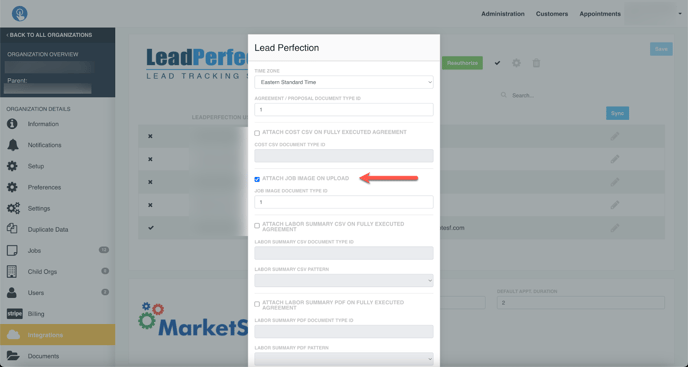
- On the organization’s Integrations tab, we’ve moved the configuration settings to the Gear icon.

- Accessing the gear icon will bring up the configuration screen where you can adjust the properties of the integration.
- You can adjust:
-
-
- Time Zone
-
-
-
- Agreement / Proposal Document Type Id:
-
- This sets the Document Type Id in LeadPerfection (LP) when the agreement or proposal document is uploaded. This is utilized on the LP side to potentially restrict access to certain documents.
-
- Agreement / Proposal Document Type Id:
-
-
-
- Attach Cost CSV on Fully Executed Agreement:
-
-
-
-
-
- This is a checkbox to determine if you want the Cost CSV to be attached when an agreement is fully executed.
-
-
-
-
-
- Cost CSV Document Type Id:
-
- This value is only available when the option is selected to upload the Cost CSV. This will give the user the ability to specify the appropriate document type ID for these cost CSV files.
-
- Cost CSV Document Type Id:
-
To add to our Lead Perfection Integration Enhancements, you also have the ability to synchronize photos from OCC to Lead Perfection