![Icon for Courses-1.png]](https://help.oneclickcontractor.com/hs-fs/hubfs/Icon%20for%20Courses-1.png?height=40&name=Icon%20for%20Courses-1.png)
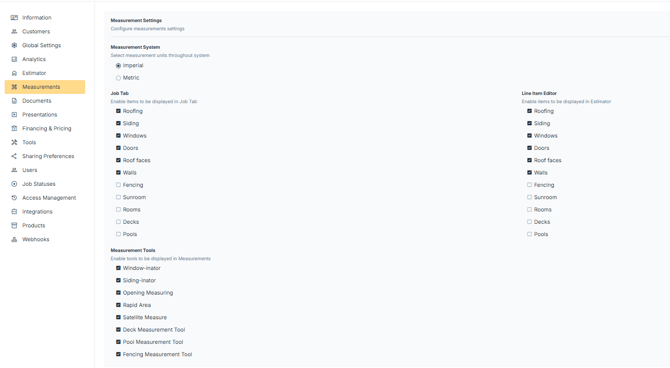
Measurement settings determine which measurement tools and categories are available throughout the platform. These settings are configured in the Measurements section of the Administration Dashboard and affect both the Job view and the Estimator.
Step 1: Open Measurement Settings
-
Click Measurements.
Step 2: Select the Measurement System
The measurement system determines the unit of measurement used throughout the platform.
-
Select Imperial or Metric.
-
Click Save.
This setting applies globally across jobs and estimates.
Step 3: Configure Job Tab Measurement Categories
Measurement categories determine which measurement tools appear within the Job screen.
-
Select the Measurement Categories to enable.
-
Click Save.
Examples of available categories include:
-
Roofing
-
Siding
-
Windows
-
Doors
-
Roof Faces
-
Walls
-
Fencing
-
Sunroom
-
Rooms
-
Decks
-
Pools
Only the selected categories will appear within the Job tab.