![Icon for Courses-1.png]](https://help.oneclickcontractor.com/hs-fs/hubfs/Icon%20for%20Courses-1.png?height=40&name=Icon%20for%20Courses-1.png)
Dynamic Presentations is a powerful new feature that empowers Sales Representatives to create personalized and impactful presentations for each customer they meet.
- By leveraging this feature, Sales Reps can enhance their pre-appointment prep to cater to the specific needs of every customer they interact with.
This new feature is not automatically turned on for your organization. To turn Dynamic Presentations on, you will need to have Administration access on OCC from within the Global Settings tab.
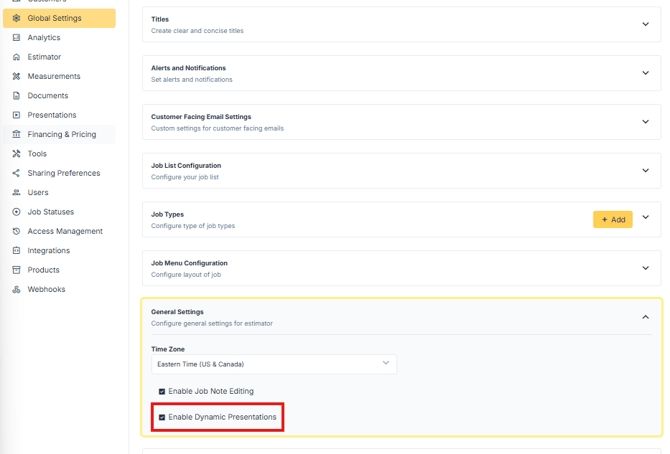
By checking this box, your Sales Reps will have Dynamic Presentations turned on.
Note: this does not allow them to upload their own presentations. This allows them to take as many pages as they wish from already existing presentations to create their own custom presentation.
Don't forget to click Save Changes after checking the Enable Dynamic Presentations checkbox.
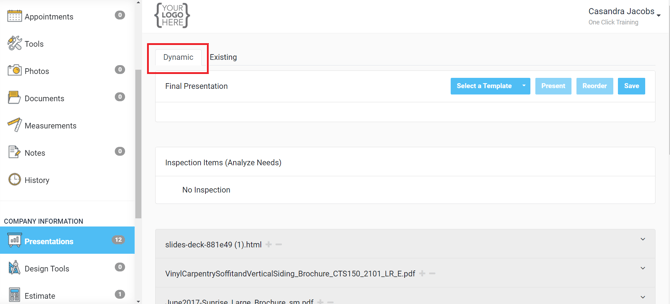
Once turned on, you will be able to view the Dynamic Presentations option from within the Presentations tab of any customer.