![Icon for Courses-1.png]](https://help.oneclickcontractor.com/hs-fs/hubfs/Icon%20for%20Courses-1.png?height=40&name=Icon%20for%20Courses-1.png)
1. Objective
Execute OCE–OCF bridge activations with:
- Proper user alignment
- Controlled activation timing
- Clear ownership across teams
- Full visibility across all stages
This SOP governs the end-to-end bridge lifecycle, from request intake through activation and post-activation validation.
2. Definition: Bridge Integration
The OCE–OCF Bridge is an integration between OCE and OCF / 1LOOK that allows users to move between systems using shared SSO credentials and a connected workflow.
The bridge requires:
- Both systems to be properly configured
- Users to exist and match across both systems
- Controlled activation timing
3. Critical Risk Areas
3.1 SSO Credentials
- Users must exist in both systems
- Emails and phone numbers must match where applicable
- Deleted or blocked users in OCE may also be blocked in OCF
User validation must confirm:
- Active users only (including users with access to only one system)
- Matching emails and phone numbers (where applicable)
- Correct permission levels
Failure to validate users results in access issues and poor user experience.
3.2 Billing Impact
There is no direct equivalency between certain user types in OCE and OCF (e.g., “Free” users or installer roles).
Users designated as “Free” in OCE may still be billable in OCF unless explicitly validated.
User validation must ensure:
- Only users requiring access are included
- All unnecessary or non-operational users are removed prior to activation
Failure to validate user lists may result in unintended billing and downstream issues.
3.3 Activation Timing
- Premature activation can break the integration
- Both systems must meet minimum setup requirements prior to activation
While recoverable, early activation creates avoidable issues, delays, and poor customer experience.
4. Ownership
| Area | Owner |
|---|---|
| Intake & Ticket Creation | Implementation / Onboarding |
| Ticket Enrichment | Process Owner |
| User List Collection | First Training Owner |
| User Validation | Process Owner |
| Dealer Confirmation | Account Manager |
| Activation | Process Owner |
| Training | Implementation / Onboarding |
| Post-Activation | Account Manager |
5. Process Overview
| Step | Stage | Owner | Output |
|---|---|---|---|
| 1 | Intake | Implementation | Ticket created |
| 2 | Enrichment | Process Owner | Ticket completed |
| 3 | User List Collection | Training Owner/ Process Owner | User list posted |
| 4 | Validation | Process Owner | Discrepancies identified |
| 5 | Confirmation | Account Manager | Final list approved |
| 6 | Pre-Activation | Process Owner | Readiness confirmed |
| 7 | Activation | Process Owner | Bridge enabled |
| 8 | Training | Implementation | Users trained live |
| 9 | Post-Activation | Account Manager | Dealer operational |
6. Step-by-Step Procedure
Step 1 — Request Intake
Owner: Implementation / Onboarding
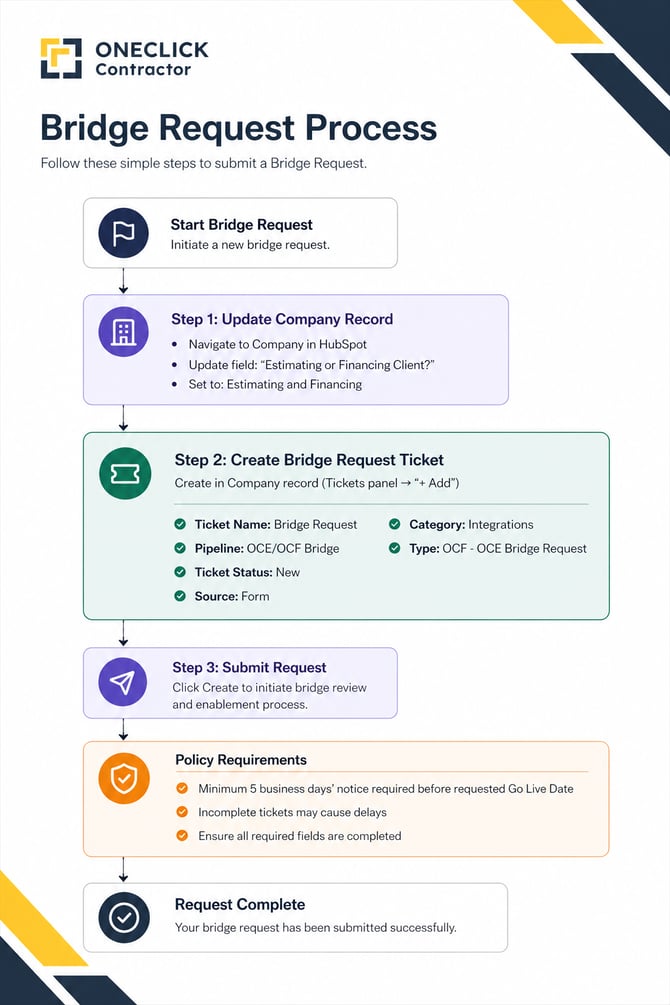
- Update Company field: Estimating and Financing (required for reporting accuracy)
- Create ticket under the Company record
- Enter Go Live Date in ticket description
System of Record:
All requests must be created and tracked in the Bridge pipeline:
https://app.hubspot.com/contacts/4136968/objects/0-5/views/unassigned/board?prefetch=
Policy:
- A minimum of 5 business days’ notice is required prior to the requested Go Live Date
- Requests submitted without sufficient notice may miss review windows and delay activation timelines
- Incomplete or incorrectly submitted requests may result in reduced visibility, delayed review, and a less controlled customer experience
Step 2 — Ticket Enrichment
Owner: Process Owner
- Add Org ID
- Add Org link
- Add 1LOOK SCP link
- Add Monday board (if available)
Policy:
- Perform one structured follow-up per missing item
- Avoid repeated chasing
Step 3 — User List Collection
Owner: First Training Owner | Process Owner
- Compile user lists from OCE and OCF
- Include:
- Name
- Role
- Post in Company notes and tag Process Owner
Step 4 — User Validation
Owner: Process Owner
Compare OCE vs OCF users and identify:
- Missing users
- Email mismatches
- Users present in only one system
- Unnecessary users (billing risk)
- Post discrepancies and tag Account Manager
Step 5 — User Confirmation
Owner: Account Manager
- Confirm discrepancies with dealer
- Finalize user list
- Communicate billing implications if applicable
- Post final approved list and tag Process Owner
Step 6 — Pre-Activation Check
Owner: Process Owner
Confirm:
- User list is finalized and approved
- Minimum system setup requirements are met in both OCE and OCF
- Go Live Date is confirmed
- Training is scheduled
Step 7 — Activation
Owner: Process Owner
Requirements:
- User validation complete
- Systems ready
Actions:
- Enable bridge in OCE
- Log activation in Company notes
- Tag onboarding/implementation teams
Edge Case:
- If activation was missed and training is complete → activate immediately
Step 8 — Training (Live)
Owner: Implementation / Onboarding
- Conduct training with bridge active
- Ensure users operate in live environment
Step 9 — Post-Activation
Owner: Account Manager
- Confirm access is working
- Identify any sync issues
- Document outcomes
7. Core Rules
- The Bridge pipeline is the system of record for all requests
- All notes must be logged in the Company record
- Slack is not a system of record
- Activation must follow readiness checks
- One follow-up per dependency
Visibility Rule:
Requests not properly created or tracked may not receive timely review, increasing the risk of delays and impacting the customer experience
8. Definition of Done
The process is complete when:
- Bridge is enabled
- User list is validated and confirmed
- Activation occurred after readiness requirements were met
- Training completed with bridge active
- All notes are logged in Company
- Ticket is closed
9. Internal Positioning
Use:
“The OCE–OCF Bridge is a controlled integration activated after user alignment and readiness checks.”
Avoid:
- “We can just turn it on”
- “It’s automatic”
- “They’re ready because they bought both”
10. Out of Scope
- Price presentation configuration
- Dealer usage instructions
- HubSpot navigation guidance
- Scenario tracking
These are handled outside this SOP.