![Icon for Courses-1.png]](https://help.oneclickcontractor.com/hs-fs/hubfs/Icon%20for%20Courses-1.png?height=40&name=Icon%20for%20Courses-1.png)
Article Introduction
After an agreement has been prepared for signature, OCC provides several places where you can monitor its progress.
Use the Agreements tab to review the agreement’s overall status, the Signatures tab to check the progress of individual recipients, and the History tab to review email activity associated with the job.
Together, these tabs can help you determine whether an agreement has been sent, viewed, partially completed, or fully signed.
For instructions on starting the signature process, see Preparing an Agreement for Signature in the Estimator.
Review the Overall Agreement Status
Open the customer job and select the Agreements tab from the Estimator’s left panel.
Locate the applicable agreement and review the Status column.
The overall status may show:
- Sent when the agreement has been sent but the signing process is not complete
- Signed when the required signing process has been completed
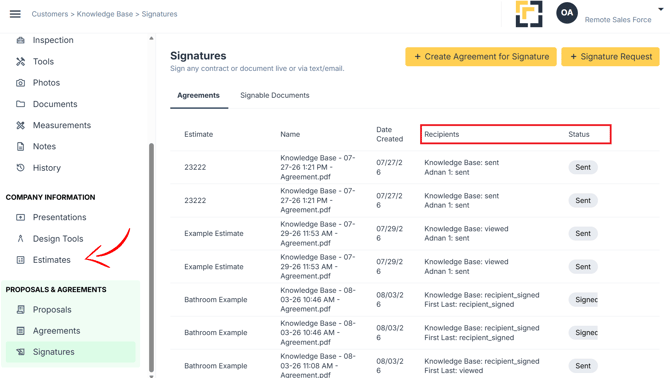
Use the agreement name and Date Created to confirm that you are reviewing the correct version.
Review Each Recipient’s Progress
In the Agreements tab, review the Recipients column.
This area shows the recipients associated with the agreement and the current progress recorded for each one. Depending on where the recipient is in the workflow, the status may indicate that the agreement was:
- Sent
- Viewed
- Signed
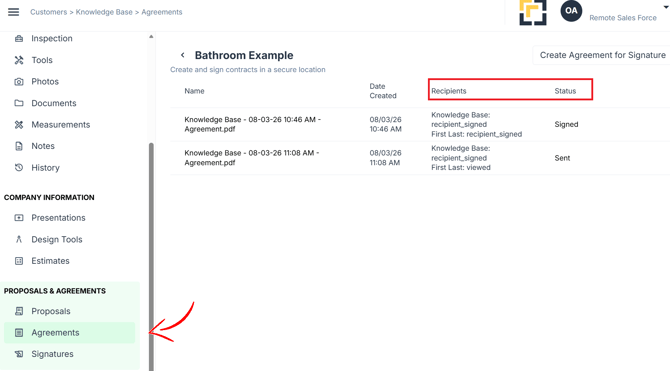
For example, one recipient may have completed their signature while another recipient has only viewed the agreement. In that situation, the agreement may remain in a Sent status until the remaining required signer completes their fields.
Review the Agreement in the Signatures Tab
Open the Agreement tab
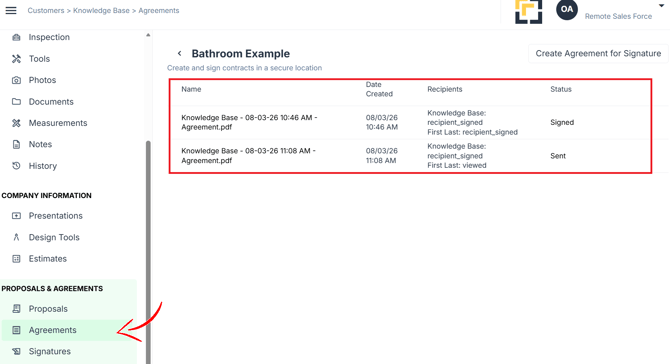
This tab provides another view of the agreements created for the job and may display:
- Name
- Date
- Recepients
- Status
Review Email Activity in the History Tab
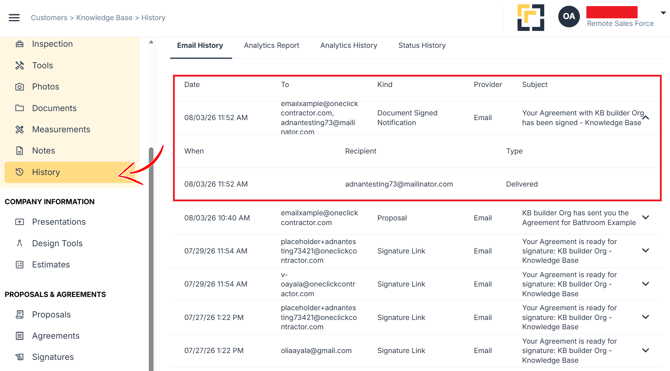
Open the History tab to review email activity for the customer job.
The history can help confirm:
- When an email was sent
- What type of email was sent
- Whether the email was opened
The History tab provides email activity, while the Agreements and Signatures tabs provide the agreement and recipient statuses.
Determine Where the Agreement Is Waiting
When an agreement has not been completed, review the information in this order:
- Check the overall Status in the Agreements tab.
- Review the individual recipient progress.
- Open the Signatures tab to confirm which recipient has not completed their part.
- Review the History tab to determine whether the related email was sent or opened.
This can help identify whether the agreement is waiting for delivery, review, or completion by a specific recipient.