![Icon for Courses-1.png]](https://help.oneclickcontractor.com/hs-fs/hubfs/Icon%20for%20Courses-1.png?width=36&height=36&name=Icon%20for%20Courses-1.png)
Before you begin
Your organization must already have FeneVision WEB configured and the manufacturer enabled
.Steps
Open Safari settings. In iPad Settings, open Safari and turn off Prevent Cross-Site Tracking.
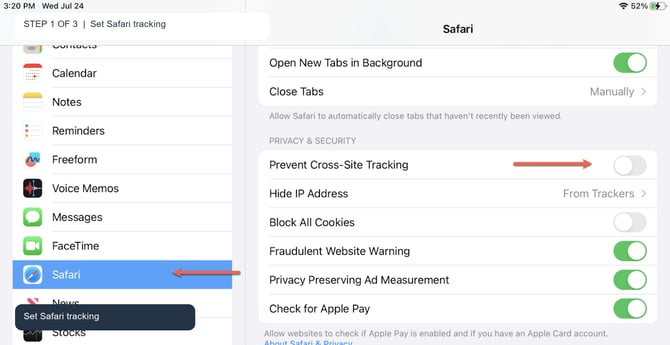
Safari must not block cross-site tracking.
Open Chrome settings. In iPad Settings, open Chrome and turn on Allow Cross-Website Tracking.
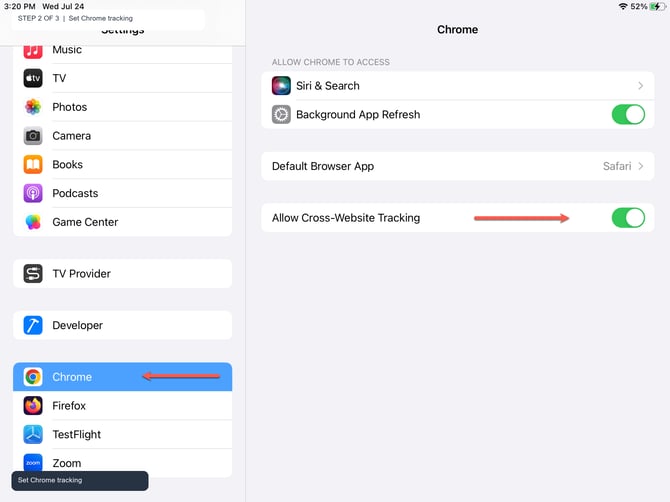
Chrome must allow cross-website tracking.
Open Firefox settings. In iPad Settings, open Firefox and turn on Allow Cross-Website Tracking.
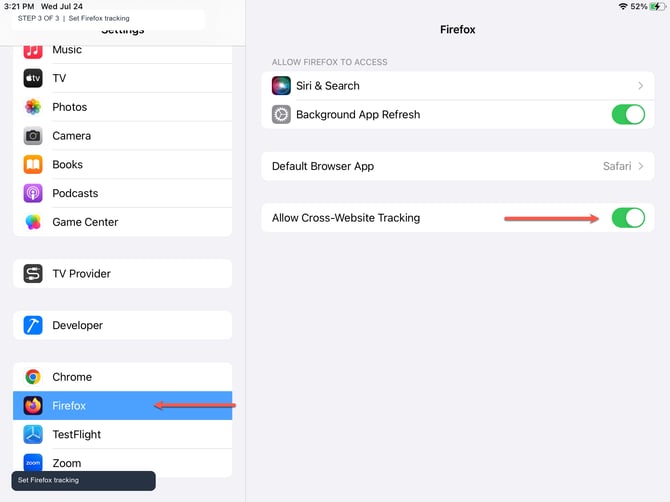
Firefox must allow cross-website tracking.
Remember
What you see can differ depending on your organization's settings and permission level. If you cannot complete a step, contact your manager or support.