![Icon for Courses-1.png]](https://help.oneclickcontractor.com/hs-fs/hubfs/Icon%20for%20Courses-1.png?height=40&name=Icon%20for%20Courses-1.png)
Article Introduction
Estimates in One Click Contractor typically display the final calculated price for products and services. However, there may be situations where your team needs more detailed pricing information.
The Product CSV provides a downloadable spreadsheet containing a more granular breakdown of estimate data, including product pricing, quantities, units, and cost-related fields. This file can be used for internal review, reporting, or deeper analysis of the estimate structure.
What the Product CSV Contains
The Product CSV exports a spreadsheet containing detailed information for each product included in the estimate.
Fields commonly included in the file may include:
-
Group
-
Included status
-
Product Type
-
Product ID
-
Product Name
-
SKU
-
Description
-
Quantity
-
Unit
-
Product Price
-
Labor Price
-
Unit Price
-
Unit Cost
-
Extended Price
-
Extended Cost
-
MSRP
This level of detail allows teams to review how estimate pricing is structured beyond the final totals shown in the estimator.
Download the Product CSV
The Product CSV can be downloaded from the Estimate main view in the Estimator.
-
Click the Additional Options (...) Icon.
-
Generate the Product CSV File.
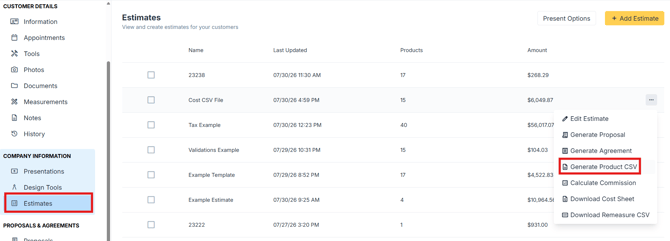
The file will download to your device and can be opened in spreadsheet tools.
Important Notes
-
The Product CSV is intended for internal use and may contain fields not shown in customer-facing documents.
-
The exported file reflects the current state of the estimate at the time it is downloaded.
-
If you cannot access the CSV export option, your user permissions may be restricted.