![Icon for Courses-1.png]](https://help.oneclickcontractor.com/hs-fs/hubfs/Icon%20for%20Courses-1.png?width=36&height=36&name=Icon%20for%20Courses-1.png)
Estimate groups help organize products inside an estimate. Groups can be added, renamed, edited, or deleted, and each group can display its own subtotal when included in the estimate.
What Are Estimate Groups?
Estimate groups are sections inside an estimate that help organize products by category, package, room, scope, or any other structure needed.
You can add an estimate group use the +Add Group button
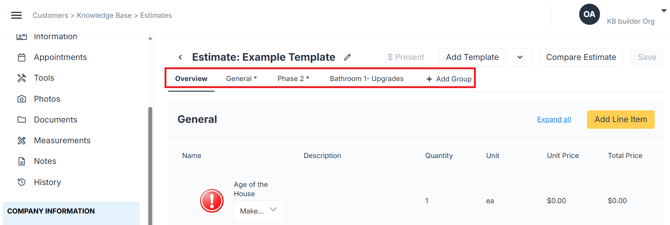
New options will be automatically included in the Estimate and the documents you send out to your clients.
Step 1: What You Can Do with Groups
You can:
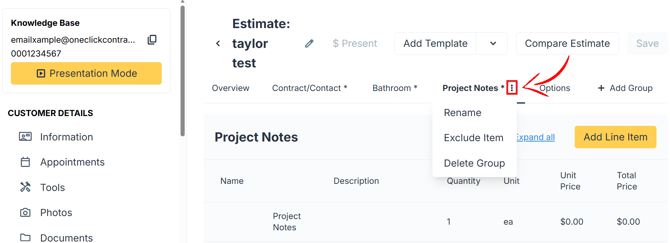
- Add a new group
- Rename an existing group
- Exclude the option group
- Delete the option group
- Include or not include in the estimate
💡 Notes:
- Each group can have its own subtotal
- The Overview tab shows the full estimate
- A group must be set to Included to show in the estimate
- Removing or deleting a group may affect products assigned to it
- Access to edit groups may depend on user permissions