![Icon for Courses-1.png]](https://help.oneclickcontractor.com/hs-fs/hubfs/Icon%20for%20Courses-1.png?height=40&name=Icon%20for%20Courses-1.png)
What Job Resources are
Job Resources are documents that can be selected or excluded per estimate.
These documents are not automatically included in every proposal or agreement. Instead, they allow representatives to add documentation based on the needs of a specific job.
Common examples include:
-
Additional disclosures
-
Customer acknowledgement forms
-
Supplemental agreements requiring signature
-
Visual aids used to help explain products or services during a sales conversation
Where Job Resources Are Configured
Job Resources are configured in the Documents library when uploading a document.
When a document is marked as a Job Resource, it becomes available in the Estimator across the entire organization.
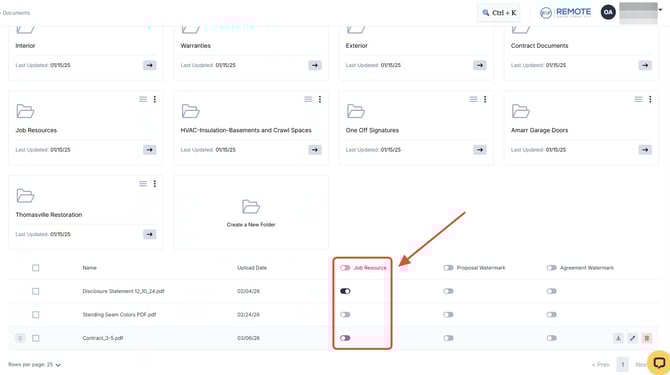
Once enabled:
-
All users will be able to access the document
-
The document can be selected when building an estimate
💡 Notes:
-
Job Resources are available organization-wide once enabled.
-
These documents are optional and must be selected manually in the estimator.
-
Layout documents are always included automatically, while Job Resources are job-specific selections.