![Icon for Courses-1.png]](https://help.oneclickcontractor.com/hs-fs/hubfs/Icon%20for%20Courses-1.png?height=40&name=Icon%20for%20Courses-1.png)
In Financing and Pricing, the Price Presentation settings control how pricing is displayed to customers. Each section in this area directly affects what appears during the presentation.
Show Price Presentation
This setting enables or disables the Price Presentation feature.
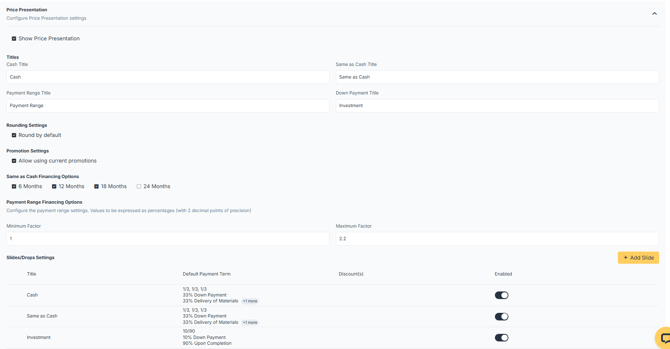
When enabled, pricing can be displayed using structured presentation options:
-
Titles: This section controls the names shown on pricing options.
-
Rounding Settings: This setting controls how pricing values are displayed.
-
Promotion Settings: This setting controls whether current promotions are available in the presentation.
-
Same as Cash Financing Options: This section controls which Same as Cash terms are available.
-
Payment Range Financing Options: This section controls how payment ranges are calculated.
-
Slides/Drops Settings: This section controls how pricing options are presented.