![Icon for Courses-1.png]](https://help.oneclickcontractor.com/hs-fs/hubfs/Icon%20for%20Courses-1.png?width=36&height=36&name=Icon%20for%20Courses-1.png)
An estimate in One Click Contractor is built using a structured hierarchy designed to organize pricing, scope, and presentation clearly. This structure allows businesses to create anything from simple quotes to highly detailed, multi-category proposals depending on their configuration and onboarding setup.
Main Estimate Structure
An estimate is composed of layered components that work together:
Groups
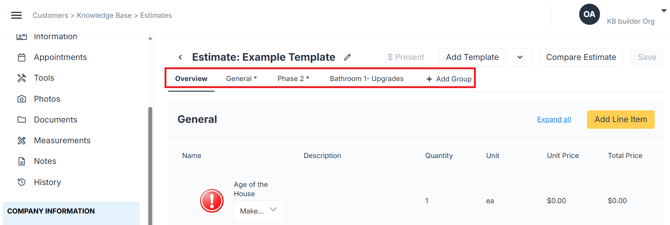
Groups appear as tabs within the estimate. Groups organize work by category or type of project.
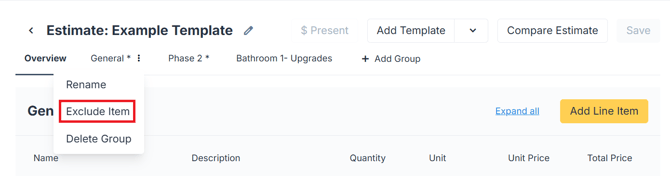
Groups can be included or Excluded in the final estimate.
Line Items
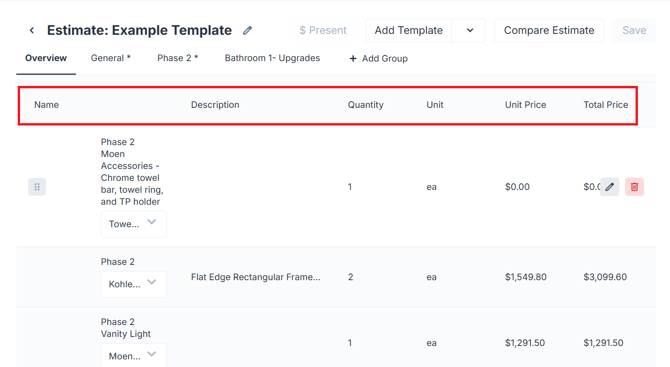
Line items are the individual products or services.
- Line items represent the actual billable components of the project
-
Line items are pulled directly from the Price List.
-
They contain the exact descriptions and pricing set up in the tool.
- Inputting the specific amount, the estimator auto calculates prices.
Options
Options in a Price List are the choices a customer can make for a product.
For example, when buying a window, the main product might be a double-hung window. The options could include:
- Size
- Frame color
- Glass type
- Grid style
- Hardware color
- Screen type
- Left- or right-hand opening
Some options are included in the regular product price. Others add or subtract money from the total.
In simple terms: the product is what the customer is buying, and the options are how they want it made or customized.
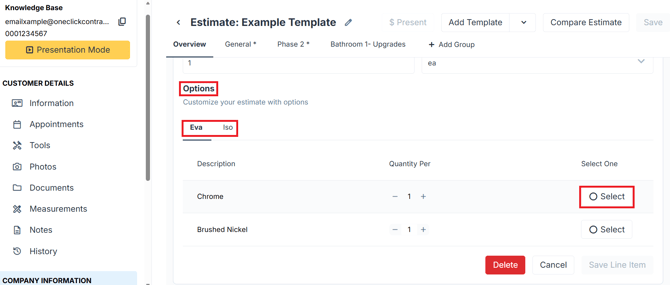
Options can be selected in the Line Item.
Other payment and pricing Components
In addition to line items, estimates may include other pricing elements such as sales tax, discounts and markups.
These additional componentes are customized per build and will be explored in specific knowledge base articles.
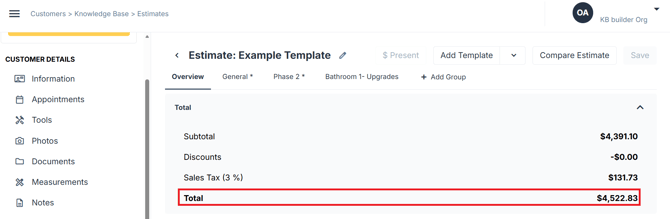
Total
The total will automatically include any of the additional pricing components discussed in the previous article section.
💡 Notes:
- Depending on your current set-up, custom line items can be created, modified or deleted as needed.
- Option settings are configured in the Price List.
- They can be set as single, allowing the user to choose one of them; or multiple, allowing them to choose all the ones they need.
- Every Option Tab; for example Eva and Iso in the image above work independently.
- A Line Item can have as many options as needed.