![Icon for Courses-1.png]](https://help.oneclickcontractor.com/hs-fs/hubfs/Icon%20for%20Courses-1.png?width=36&height=36&name=Icon%20for%20Courses-1.png)
If you add up the line items on an estimate, apply your sales tax rate, and still can't match the total, the tax is most likely being applied to only part of the estimate. When your tax setup applies tax to products only, labor items are left out of the taxable amount, so the tax is calculated on a smaller number than the full subtotal.
Most Common Cause: Tax Applies to Products Only
Two settings work together to produce the tax on an estimate:
- Tax rate: the sales tax percentage set for your organization.
- Tax configuration: which items on the estimate the tax applies to. When it is set to apply to products only, labor items are not taxed.
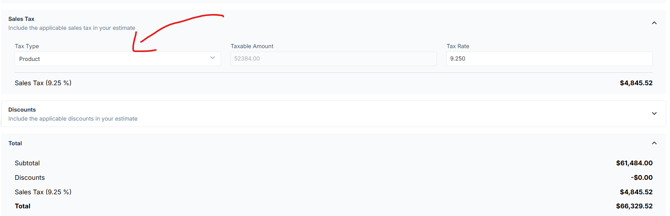
With a products-only configuration, the tax is calculated on the taxable amount (the total of your product items), not on the full subtotal. The estimate does not always make this split obvious, which is why a manual calculation using the full subtotal won't match.
Example
An estimate has $8,000 in products and $2,000 in labor, with a 9% tax rate applied to products only.
Subtotal
- Tax applied to full subtotal:
$10,000
| Tax applied to products only:$10,000
Taxable amount
- Tax applied to full subtotal:
$10,000
| Tax applied to products only:$8,000
Tax (9%)
- Tax applied to full subtotal:
$900
| Tax applied to products only:$720
Total
- Tax applied to full subtotal:
$10,900
| Tax applied to products only:$10,720
The $180 difference is the tax that would have been charged on labor. Amounts are for illustration only.
How to Check Your Estimate
There's a section in the estimate that shows the tax and what it is being applied to.
If the Issue Continues
If the total still doesn't match, or you want tax applied to labor as well, contact One Click Contractor support. Include the job or estimate and the total you expected, and we'll review your tax rate and tax configuration with you.
💡 Notes:
- Confirm the tax rate your organization uses. Don't assume a rounded rate; for example, 9.25% gives a different result than 9%.
- Add up only the product line items to get the taxable amount.
- Multiply the taxable amount by your tax rate. Add the result to the full subtotal (products and labor).
- Compare your result to the estimate total. If it matches, the estimate is calculating as configured.