![Icon for Courses-1.png]](https://help.oneclickcontractor.com/hs-fs/hubfs/Icon%20for%20Courses-1.png?height=40&name=Icon%20for%20Courses-1.png)
Article Introduction
The Measurement Tools inside the Estimator allow users to quickly calculate areas, elevations, and structural measurements directly within a job. These tools help streamline estimating by automatically calculating values that feed into line items.
This article provides an overview of how to access and use the available measurement tools.
Accessing Measurement Tools
Within a job:
-
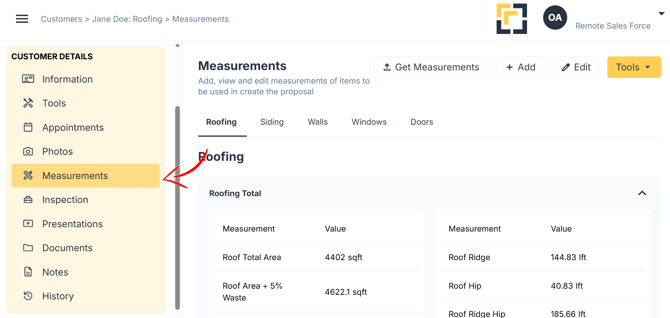
Go to the Measurements tab.
-
On the right-hand side, click Tools.
-
Select one of the available tools from the dropdown menu.
Window-inator
The Window-inator tool requires you to add a new elevation before measurements can begin.
You can:
-
Upload an elevation image directly, or
-
Send an upload invitation via Email or Text Message
Once the elevation is added, you can begin marking and measuring window openings.
Rapid Area
Includes Aerial and street view. The Rapid Area tool supports:
-
Flat Area
-
Calculated Area
-
Degrees
-
Pitch
This tool is useful for quickly calculating roof or surface areas based on slope and pitch values.
Satellite Measure
The Satellite Measure tool allows you to:
-
Zoom in
-
Scroll across the property
It is ideal for measuring roof sections and exterior layouts using aerial imagery.
Deck Measurement Tool
The Deck Tool allows zooming and scrolling for precision measurement.
You can define:
-
Deck Name
-
Deck Area (Sq Ft)
-
Railing (Linear Ft)
-
Wall (Linear Ft)
-
Railing Area (Sq Ft)
This tool helps calculate decking materials and associated components.
Fencing Measurement Tool
The Fencing Tool allows you to measure fence lines and calculate total linear footage for fencing projects.
Pool Measurement Tool
The Pool Tool enables measurement of pool dimensions and surrounding areas for accurate material and labor calculations.
Important Note
Measurement settings must be enabled in the Administration Dashboard for these tools to appear in the Estimator.