![Icon for Courses-1.png]](https://help.oneclickcontractor.com/hs-fs/hubfs/Icon%20for%20Courses-1.png?height=40&name=Icon%20for%20Courses-1.png)
Using the Percent Markup Pricing on an Estimate
If your user account has the “update_markup” permission on the estimate AND the organization has markup enabled, you will now see a section below “Discounts” on the overview tab called “Markups”
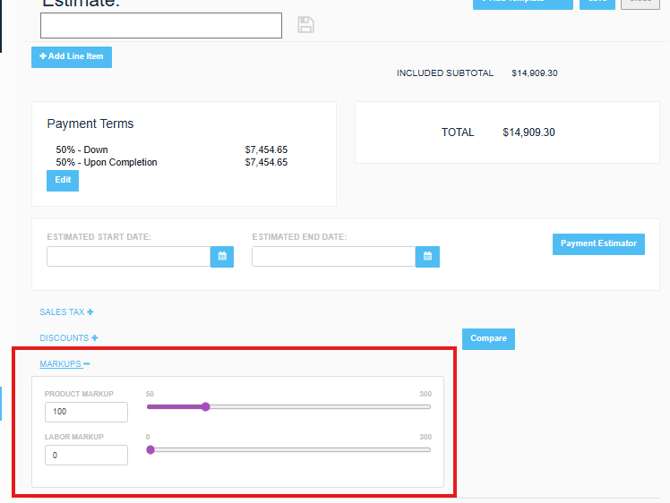
Clicking to expand markups will allow you the ability to be able to adjust the product and/or labor markup. Immediately after your change is made, the total price will recalculate and update the estimate based on the newly entered values. This allows you to quickly and easily adjust markup percentages and calculate your new price immediately!
Values can either be entered in the text box next to the value or using the drag and drop slider to determine your value. It’s just that easy!
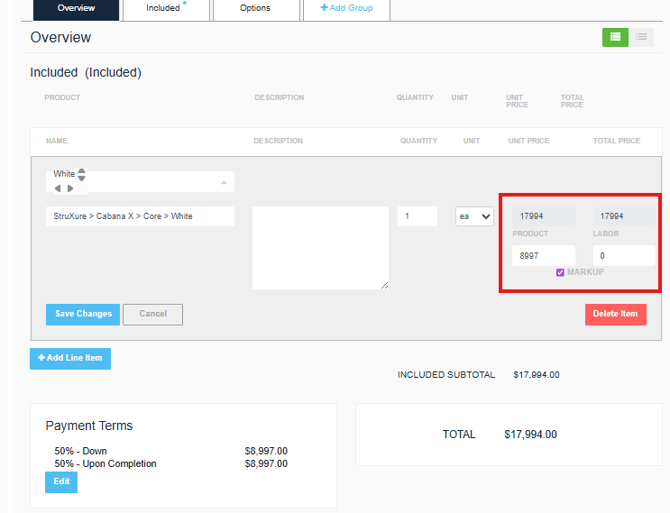
Editing Markup on Estimate Line Items
When editing product price and labor price, you can edit whether the line item is markupable or not.
A couple of Frequently Asked Questions
How does this work for estimates created before this preference was added?
Estimates created prior to enabling this setting will default to a 0% product or labor markup, meaning no price adjustment will occur. After enabling markup, all adjustments must fall within the configured minimum and maximum thresholds for each price type.
What happens if I need to change my min/max values?
Simply edit the preference at the organization (there is no requirement to activate the price list). Now the rep will be able to adjust the markup and pricing based on the newly provided min/max values.
How does this work with discounts?
This feature was developed to work alongside discounts. Discounts will be applied AFTER the markup has been calculated.