![Icon for Courses-1.png]](https://help.oneclickcontractor.com/hs-fs/hubfs/Icon%20for%20Courses-1.png?height=40&name=Icon%20for%20Courses-1.png)
If you are unable to log in to One Click Contractor and see messages such as “Invalid Email or Password,” “User Blocked,” or are stuck in a login loop, the issue is typically related to the login method, account status, or system access.
What You’re Seeing
You may notice:
-
An Invalid Email or Password message
-
A User Blocked message
-
A message asking you to contact One Click Contractor
-
An endless login loop
-
Login fails even when using correct credentials
- Reset password emails that aren't coming through
Why This Happens
These issues are typically caused by one of the following:
-
Using the wrong login page (non-SSO)
-
Account-related issues such as:
-
Open or past-due invoices
-
Account being blocked or restricted
-
-
Email-related issues (incorrect or unrecognized email)
-
Session or browser issues causing login loops
Incorrect Login URL
One Click Contractor uses Single Sign-On (SSO), which requires a specific login URL. If you are unable to log in to One Click Contractor and see an “Invalid Email or Password” message, the issue may be caused by using an incorrect login URL.
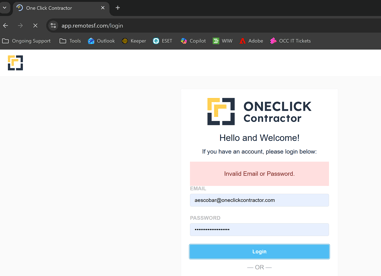
If you are logging in at the following URL, you will not be able to access your account:
-
Incorrect URL:
https://app.remotesf.com/login
This page does not support One Click Contractor’s SSO authentication.
Solution: Use the Correct SSO Login URL
To successfully log in, you must use the SSO login page.
Step 1: Additional Troubleshooting Steps
-
Clear Browser Cache if the wrong page continues to load
-
Open Incognito Window to avoid saved session issues
-
Confirm Email Address is correct and active
-
Update Bookmarks to use the SSO login link
When to Contact Support
Contact your administrator or One Click Contractor support if:
-
You see a User Blocked message
-
You are asked to contact OCC
-
You are stuck in a login loop
-
You are using the correct SSO link but still cannot log in
These situations are typically related to account status or configuration and cannot be resolved from the login screen.