![Icon for Courses-1.png]](https://help.oneclickcontractor.com/hs-fs/hubfs/Icon%20for%20Courses-1.png?width=36&height=36&name=Icon%20for%20Courses-1.png)
Each estimate uses the active Price List available when the estimate is created. If your organization updates or replaces its active Price List afterward, an existing estimate continues to use the previous version; so, recent changes will not show on an older estimate.
Why Can’t I Find the New Product?
A product recently added to your organization’s active Price List may not appear in an estimate that was created before the Price List changed.
The existing estimate remains connected to the earlier Price List and cannot access products added to the newer version.
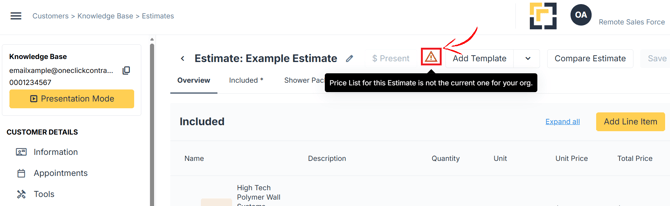
How Can I Tell Whether My Estimate Is Using an Older Price List?
The estimate will show a red warning sign.
How Do I Fix The Issue?
Create a new estimate.
New estimates pull from the organization’s current active Price List, allowing you to access recently added products and other Price List updates