![Icon for Courses-1.png]](https://help.oneclickcontractor.com/hs-fs/hubfs/Icon%20for%20Courses-1.png?height=40&name=Icon%20for%20Courses-1.png)
Article Introduction
If detailed pricing is not appearing on your estimate, the most common cause is a product in the Price List configured with Edit Mode Only visibility. When a product is set to this visibility level, the system hides detailed pricing to prevent inconsistencies in customer-facing documents.
Why This Happens
Products marked as Edit Mode Only are not designed to appear in customer-facing outputs.
If detailed pricing were shown while one or more line items were hidden, the total would not logically add up for the customer.
For example:
-
Visible Item 1 — $1,000
-
Visible Item 2 — $500
-
Total — $1,750
If $250 is coming from hidden line items, the estimate would appear inaccurate. To prevent this confusion, the system disables detailed pricing whenever hidden items are present.
Primary Fix
-
Go to the Price List Editor in the Administration Dashboard.
-
Locate products marked with Visibility: Edit Mode Only.
-
Change the visibility setting to Always and Save changes.
-
Activate the Price List.
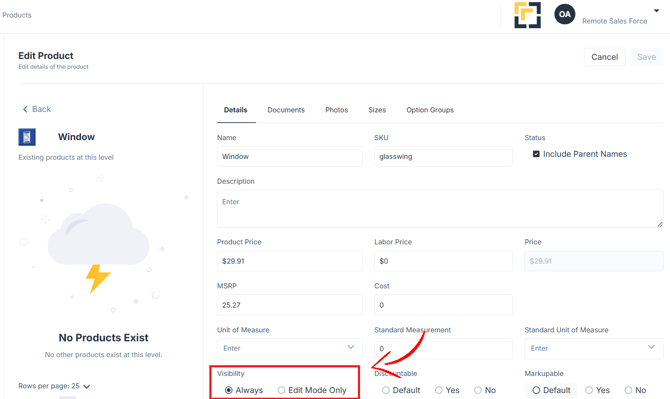
Finding the hidden products could prove challenging, you may need to contact a support rep to help you identify them.
Once reactivated, detailed pricing will display again on estimates, proposals, and agreements if the pricing detail within Estimator settings are set to Always.
Alternative Option: Generate a Product CSV directly from the Estimate
If you prefer to keep certain products hidden but still need a full breakdown internally, you can generate a Product CSV.
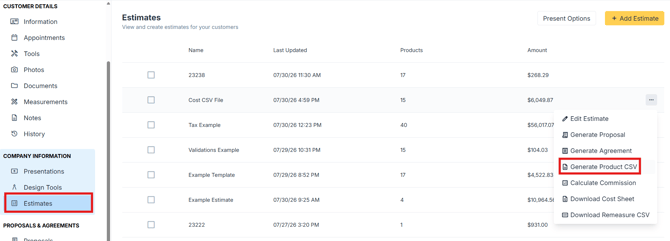
From the main Estimate screen, select the option to Generate Product CSV.
This will download a complete file including:
-
Full product descriptions
-
Pricing details
-
Line-item breakdown