![Icon for Courses-1.png]](https://help.oneclickcontractor.com/hs-fs/hubfs/Icon%20for%20Courses-1.png?height=40&name=Icon%20for%20Courses-1.png)
Article Introduction
Markup is calculated according to the settings assigned to the products and labor amounts within an estimate. Because some line items may not be eligible for markup, the calculated increase may differ from a manual calculation using the entire estimate subtotal.
Why Doesn’t the Markup Match the Entire Estimate?
Not every product or labor amount is necessarily subject to markup. Individual line items can be configured as markupable or not markupable in the system.
Does the estimator skip non markupable items?
When a line item is not markupable, the Estimator skips that amount when calculating the related markup.
For example:
Selecting a 10% product markup does not always mean the complete product total will increase by 10%. The percentage is applied only to products that are eligible for markup.
Why Do the Numbers Sometimes Look Incorrect?
The numbers may appear incorrect when the markup percentage is manually calculated using the entire estimate subtotal.
However, the Estimator may be applying different rules to individual products or labor amounts. Items that are not markupable are excluded from the calculation, while eligible items receive the selected markup.
This means the final increase can be lower than expected even though the markup calculation is working correctly.
How Can I Tell Which Items Receive Markup?
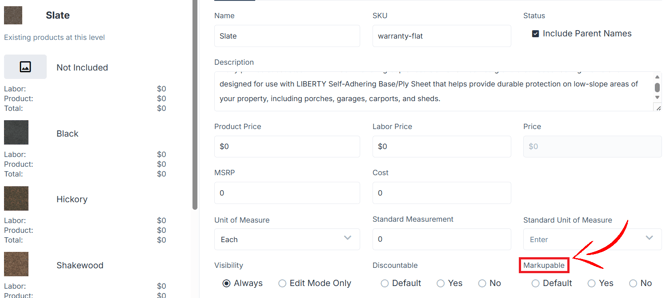
When editing product or labor pricing on a line item, the pricing can be set as markupable or not markupable.
- A markupable product price receives product markup.
- A markupable labor price receives labor markup.
- A price that is not markupable is excluded from the related calculation.
Markup is calculated first.
After markup has been applied to the eligible line items, discounts are calculated using the updated price.
How It Looks in the Backend Congifuration:
Important Notes
- Markup may not apply to every product or labor amount in an estimate.
- The selected percentage may not equal the same percentage of the entire estimate subtotal.
- The Estimator follows the markup rules assigned to each line item.
- Discounts are applied after eligible markup is calculated.
- If a line item appears to be using the wrong markup rule, contact your Organization Manager or Support.